Using Aurora DSQL with Bref
Aurora DSQL is a serverless database from AWS, compatible with PostgreSQL.
Compared to RDS databases, including Aurora Serverless, Aurora DSQL is truly serverless:
- No instance: Aurora Serverless scales the capacity of a database instance up and down, while Aurora DSQL has no instance at all. It scales with the traffic, and down to zero without cold starts: a paused Aurora Serverless database takes up to 15 seconds to resume.
- Billed per request: Aurora DSQL is billed for the requests it serves, measured in “DPUs” (Distributed Processing Units), and for the data it stores. There are no DPU charges while the database is idle, only the storage is billed. RDS and Aurora Serverless instances are billed per hour while they run. The AWS free tier includes 100,000 DPUs and 1 GB of storage per month.
- Multi-AZ: Aurora DSQL runs across three Availability Zones, with no failover to manage. RDS and Aurora Serverless databases run on an instance in a single Availability Zone, unless you pay for more instances in other zones to fail over to.
On AWS Lambda, it also requires:
- No VPC (virtual private network) and no NAT Gateway: Lambda functions connect to a public endpoint, over TLS.
- No password: applications authenticate with their IAM role.
When to use Aurora DSQL
Aurora DSQL is a good fit for:
- New applications: their schema and code can take the differences with PostgreSQL into account from the start.
- Side projects and small applications: with no fixed cost, an application with little traffic can run on AWS Lambda for $0, or a few cents per month.
- Irregular traffic: Aurora DSQL scales with the traffic, with no DPU charges when idle and no cold starts.
- Applications that need high availability without paying for standby instances.
Prefer an RDS or Aurora Serverless database for:
- Existing applications with a complex schema, or that rely on PostgreSQL features Aurora DSQL doesn’t support: triggers, extensions (like PostGIS), full-text search, changing the type of columns, etc.
- MySQL applications: Aurora DSQL is only compatible with PostgreSQL.
- Large data changes in one transaction: imports, batch updates or cascading deletes that change more than 3,000 rows at once must be split into several transactions.
- Many concurrent writes to the same rows, like a global counter: with Aurora DSQL, they conflict instead of waiting for each other.
- Reporting and analytics: Aurora DSQL is designed for transactional workloads (many short queries), not for heavy queries over large amounts of data.
Aurora DSQL is a recent service (generally available since 2025), and it evolves quickly: some of these limitations may be lifted in the future.
Creating a database
Bref Cloud
In the Bref Cloud dashboard, open the “Databases” page, click “Create database” and select “Aurora DSQL”. Create it in the same AWS account and region as your application.
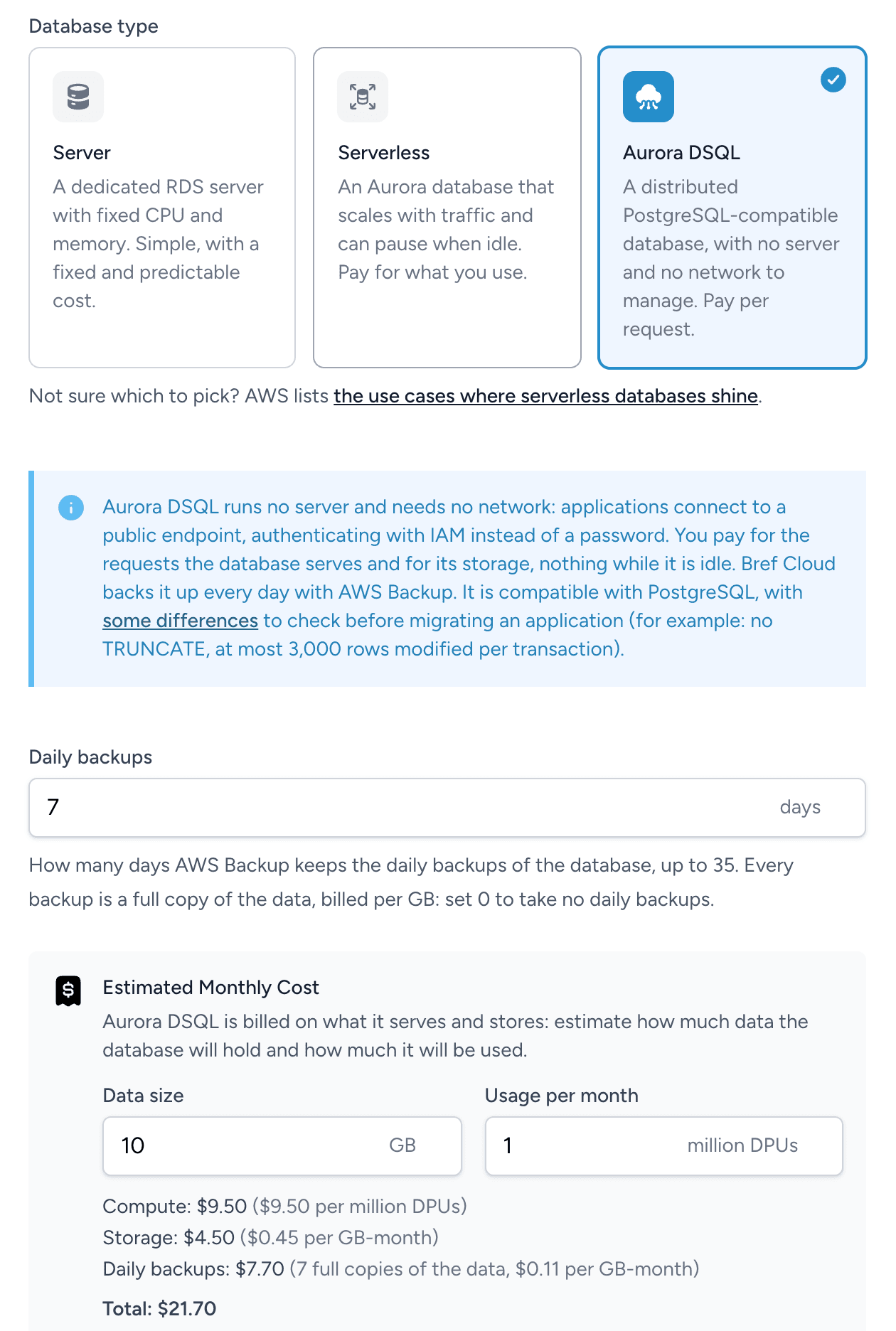
Aurora DSQL has no snapshots: Bref Cloud backs up the database every day with AWS Backup , and keeps the backups 7 days by default (set 0 to disable daily backups). Every backup is a full copy of the data, billed per GB: the form estimates what the database will cost, backups included. Bref Cloud also takes a final backup when the database is deleted.
Once the database is created, its page shows its endpoint and the configuration to add to serverless.yml.
Differences with PostgreSQL
Aurora DSQL is compatible with PostgreSQL 16, with some differences . The main ones are:
- Concurrency: when two transactions change the same rows at the same time, PostgreSQL makes the second one wait for the first one. Aurora DSQL lets both run, and the second one to commit fails with a conflict error (SQLSTATE
40001). Its changes are rolled back, and the transaction must be retried. This also applies to queries run outside an explicit transaction: each query is a transaction on its own. The longer a transaction lasts, the more likely another transaction changes the same rows in the meantime. The Laravel package handles retries automatically. - Schema changes: a transaction can contain a single schema change, and no data change. Indexes are built in the background (
CREATE INDEX ASYNC). A column added to an existing table must be nullable, without a default value. The type of a column can’t be changed, and a column can’t becomeNOT NULLafter the table is created. The primary key is declared when the table is created, and can’t be changed afterwards. A foreign key added to an existing table doesn’t check the rows that already exist (NOT VALID). - Auto-increment: there are no
SERIALcolumns, identity columns (BIGINT GENERATED BY DEFAULT AS IDENTITY) replace them. - Limits: a transaction can change up to 3,000 rows (including cascades) and 10 MiB of data, and last up to 5 minutes. A cluster accepts at most 100 new connections per second (with bursts up to 1,000).
- Collation: strings are sorted by byte (collation
C): accented letters come afterz, andlower()/upper()only change ASCII letters. - Not supported: savepoints,
TRUNCATE,SELECT … FOR SHARE, full-text search, temporary tables, triggers, PL/pgSQL (functions can only be written in SQL), advisory locks and PostgreSQL extensions.
Laravel
Install the bref/laravel-dsql package:
composer require bref/laravel-dsqlIt adds a dsql database connection to Laravel, which generates an IAM authentication token for each connection and adapts migrations to Aurora DSQL.
If your composer.json removes unused AWS services from the AWS SDK, add DSQL to the services it keeps, then run composer install. The package uses it to generate the authentication tokens.
"extra": {
    "aws/aws-sdk-php": [
        "Sqs",
        "DSQL"
    ]
}
Configure the connection, and allow the application to connect to the database, in serverless.yml:
provider:
    environment:
        DB_CONNECTION: dsql
        DB_HOST: <cluster-id>.dsql.<region>.on.aws
    iam:
        role:
            statements:
                -   Effect: Allow
                    Action: dsql:DbConnectAdmin
                    Resource: arn:aws:dsql:<region>:${aws:accountId}:cluster/<cluster-id>
Bref Cloud shows this configuration with the values of your database on the database page.
The package signs the IAM token with the AWS credentials of the environment: the IAM role of the Lambda function, or AWS_PROFILE when running locally. The token is signed locally, without any API call.
The application connects as the admin database role. To connect with another role , set DB_USERNAME and allow the dsql:DbConnect action instead.
Deploy the application and run the database migrations.
Configuration
The package adds this dsql connection, unless config/database.php already defines one:
'dsql' => [
    'driver' => 'dsql',
    'host' => env('DB_HOST'),
    'port' => '5432',
    'database' => 'postgres',
    'username' => env('DB_USERNAME', 'admin'),
    'charset' => 'utf8',
    'prefix' => '',
    'prefix_indexes' => true,
    'search_path' => 'public',
    'sslmode' => 'verify-full',
    'sslrootcert' => env('DB_SSLROOTCERT', 'system'),
],
To customize it, copy it into the connections array in config/database.php. The connection also accepts a region, for endpoints that don’t include one, such as VPC endpoints.
Connections and Octane
With PHP-FPM, Laravel opens a new database connection for every request. With Aurora DSQL, opening a connection (TLS and IAM authentication) adds latency to the request, and a cluster accepts at most 100 new connections per second (with bursts up to 1,000).
For applications with more than a few requests per second, run them with Laravel Octane, and keep the database connection open between requests with OCTANE_PERSIST_DATABASE_SESSIONS:
functions:
    web:
        handler: Bref\LaravelBridge\Http\OctaneHandler
        runtime: php-84
        environment:
            BREF_LOOP_MAX: 250
            OCTANE_PERSIST_DATABASE_SESSIONS: 1
        events:
            - httpApi: '*'
Migrations
The package adapts Laravel migrations to the differences between Aurora DSQL and PostgreSQL:
-
Migrations don’t run in a transaction, since a transaction can only contain one schema change: each statement is committed on its own. A migration that fails halfway leaves the changes it made before.
-
The primary key, unique keys and foreign keys of a new table are declared in its
create tablestatement. A unique index added to an existing table enforces uniqueness once it is built in the background. -
Auto-incrementing columns (
$table->id()) arebigintidentity columns. -
To add a column with a default value to an existing table, add it as nullable first, then set its default in a second step. Rows that already exist keep
null: fill them in batches, since a transaction can change at most 3,000 rows. Each batch runs in its own transaction, since migrations don’t run in a transaction:Schema::table('posts', function (Blueprint $table) { $table->string('status')->nullable(); }); Schema::table('posts', function (Blueprint $table) { $table->string('status')->nullable()->default('draft')->change(); }); DB::table('posts')->whereNull('status')->chunkById(1000, function ($posts) { DB::table('posts')->whereIn('id', $posts->pluck('id'))->update(['status' => 'draft']); }); -
->change()can make a column nullable, and change its default value and its comment. The type given to->change()is ignored.
The package throws an exception with an explanation when it encounters an unsupported schema change. Earlier changes in the migration may already have been committed.
Conflicts between requests
With Aurora DSQL, two transactions that change the same rows at the same time conflict: the first one to commit wins, and the other one fails with an error. All changes in the failed transaction are rolled back. This can happen, for example, when two visitors buy the last item of a product at the same time.
Queries outside of an explicit transaction, such as the query issued by $product->save() or Product::where(…)->update(…), are retried automatically by the package when they conflict, up to 3 times after the initial attempt. Since the conflict cancelled the query entirely, running it again doesn’t apply it twice. If all retries fail, the exception is passed to your application.
Queries inside a transaction can’t be run again on their own: the conflict cancels the whole transaction, including the queries that ran before, and your code may have made decisions based on data that another request just changed. The whole transaction has to run again. Laravel does it when you give DB::transaction() a number of attempts:
DB::transaction(function () use ($productId) {
    $product = Product::findOrFail($productId);
    abort_if($product->stock === 0, 409, 'Out of stock');

    $product->decrement('stock');
    $product->orders()->create(['user_id' => auth()->id()]);
}, attempts: 3);
When the two visitors buy the last item at the same time, both transactions read a stock of 1 and decrement it, but only the first one commits. The second one runs again, reads a stock of 0, and the visitor gets the “Out of stock” error. Here, attempts: 3 allows up to 3 attempts in total. Without it, a conflict throws an exception immediately; with it, an exception is still thrown if all attempts fail.
Keep in mind that:
- The closure can run several times: send emails, dispatch jobs or call APIs after the transaction, not inside it.
- The conflict is detected when the transaction commits, at the end of the closure, not on the query that changed the row.
- Rows that the transaction only reads, without changing them, are not checked: if another request changes them, the transaction still commits, based on the value it read. Read them with
lockForUpdate()when your code relies on them: it doesn’t make other requests wait like in PostgreSQL, but the transaction then conflicts if another request changes these rows. - Many requests that change the same row, like a global counter, conflict often: spread the writes over several rows when you can.
Transactions opened by Laravel or by packages have a single attempt too, for example saveOrFail(), deleteOrFail(), or syncOrFail() and the other …OrFail() methods of relationships. When they can conflict, wrap the call in DB::transaction() with attempts: the inner transaction becomes part of the outer one, which runs again.
Cache, locks and queues
The database cache store works with Aurora DSQL. Use DynamoDB instead for a cache read on every request, for locks, or for rate limiters with a lot of traffic: when many requests change the same key at the same time, Aurora DSQL makes them conflict.
For queues, use SQS rather than the database queue.
Other differences
- Without savepoints, a nested transaction is part of the transaction around it: rolling back the nested transaction rolls back nothing until the outer transaction is rolled back.
truncate()andsharedLock()are not supported.
Other PHP applications
AWS provides a connector for PDO that generates the authentication token:
composer require awslabs/aurora-dsql-pdo-pgsqluse Aws\AuroraDsql\PdoPgsql\AuroraDsql;
use Aws\AuroraDsql\PdoPgsql\DsqlConfig;
$pdo = AuroraDsql::connect(new DsqlConfig(host: '<cluster-id>.dsql.<region>.on.aws'));The Lambda function needs the same dsql:DbConnectAdmin permission as in the Laravel example above. The application then has to deal with the differences with PostgreSQL itself, for example by retrying the transactions that conflict.
Monitoring
Bref Cloud
The database page in Bref Cloud shows the activity of the database: usage (DPUs), transactions, transactions aborted by conflicts, new connections per second, commit latency and storage. It also estimates the cost of the database over the last 30 days, and lists its backups.